Motion to Vacate Order
Last Updated: July 1, 2025
|
11 U.S.C. 105 Event: Bankruptcy > Motions/Applications > Vacate, Vacate Discharge, or Vacate Dismissal Order |
A Motion to Vacate is filed by case parties as a means of requesting the Court to consider reversal of an order.
| Vacating Order | ||
| Requester | Basis | Procedure |
| Debtor / Party in Interest |
|
File Motion to Vacate |
| Vacating Discharge | ||
| Requester | Basis | Procedure |
| Interested Party | Interested Party believes a legal basis exists for discharge to be vacated or revoked. | File Adversary Proceeding (See Filing an Adversary Complaint; Adversary Filing Requirements) |
| Debtor |
Request to Vacate Discharge
|
Motion to Vacate Discharge |
| Vacating Dismissal | ||
| Requester | Basis | Procedure |
| Debtor | Request to reverse the Dismissal Order and have case reinstated | Motion to Vacate Dismissal |
Filing Requirements:
-
Motion to Vacate
-
Proposed Order (May be filed after hearing)
To File Electronically:
-
Select [Bankruptcy > Motions/Applications].
-
Enter the Case number (e.g., xx-xxxxx)
-
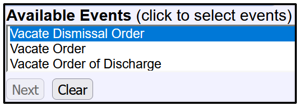
Select the appropriate event:
-
[Vacate Dismissal Order]
-
[Vacate Discharge]
-
[Vacate]; Used for vacating all other types of orders.
Note: To accurately report statistics to Congress, it is crucial that the correct event is selected.
-
-
Select the party filer. If the party is not listed, click on Add/Create New Party.
Note: The Attorney/Party Association screen may appear. If your party selection was correct, check the box to create an association. -
Browse to select the Motion (.pdf file).
Note: Supporting documents and Proof of Service may be added as attachments to this document. -
Modify the text as appropriate.
-
Verify the final docket text; if correct, click [Next] to submit your document(s).
Note: The Notice of Electronic Filing displays giving you the document number. Copies of this notice are immediately e-mailed to all participants who receive electronic notification in the case.
NOTE: A hearing will be scheduled on the motion.